
reNAMed
NAM Profile & IR Browser
A free Neural Amp Modeler player designed around one idea: finding the right profile and the right IR should be fast and comfortable.
Free
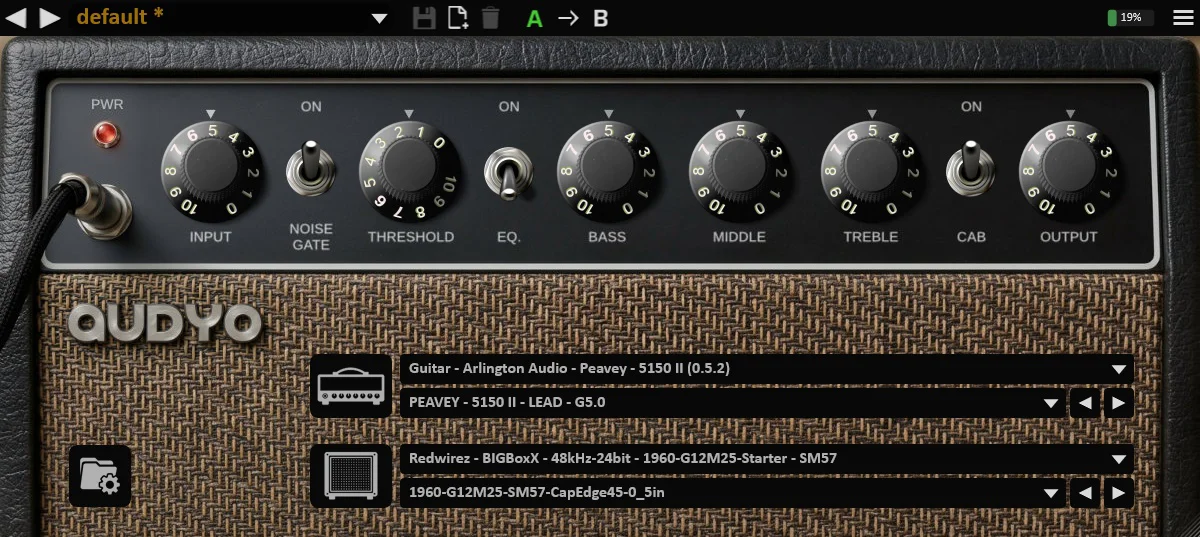
A large collection of NAM profiles and impulse responses is a blessing until you have to dig through it. reNAMed puts your whole library one click away: point it at your folders, and browse profiles and IRs from a single interface built to get you from "I want that tone" to actually hearing it with as little friction as possible. reNAMed runs natively on Linux and Windows, as a plugin or as a standalone application, so you can browse your library and play without even opening a DAW. And it costs nothing: just download it and play.
Features
Built for Navigation
An interface focused on moving through large NAM and IR collections quickly, so you spend your time playing instead of browsing file dialogs.
NAM Profiles
Load your Neural Amp Modeler profiles and switch between them without leaving the plugin window. Built on the latest NAM Core for maximum compatibility.
Impulse Responses
Pair your amp profile with the cabinet IR of your choice, browsed the same way as your profiles.
Your Library, Your Folders
Add as many library folders as you need and reNAMed scans them for you: no copying or reorganizing your files.
Linux & Windows
Native builds for both systems, with the same interface and the same workflow, as a plugin for your DAW or as a standalone application.
Presets & A/B Comparison
Create your own presets, and use the A/B function to compare models and IRs quickly and easily.
Specs
Linux
- Ubuntu 22.04+ (x86_64 / ARM64)
-

 (VST3, LV2)
- ✓ Standalone application, no DAW required
Windows
- Windows 10/11 (64-bit)
- (VST3)
- ✓ Standalone application, no DAW required
Compatibility
- ✓ All major DAWs should be supported
- ✓ Tested on: Ableton, Luna, Cantabile, Reaper
- ✓ Free to download and use
Free download
reNAMed is free. Pick your platform and start browsing your NAM profiles and IRs.